
Quick start · 3 lines of JavaScript
Any assistant, with the SDK
The @100x/ledger package measures every AI call your assistant makes and records what it earned. Any channel, any framework. No runtime dependencies.
Works in Node 18+, Bun, Deno and edge runtimes, with ESM or CommonJS. Run it on your server: your key must never reach a browser.
Quick start
Create your API keyIN LEDGER
Go to setup step 3, Connect your assistant. Select the Code · SDK tab (1), then Create my API key (2).
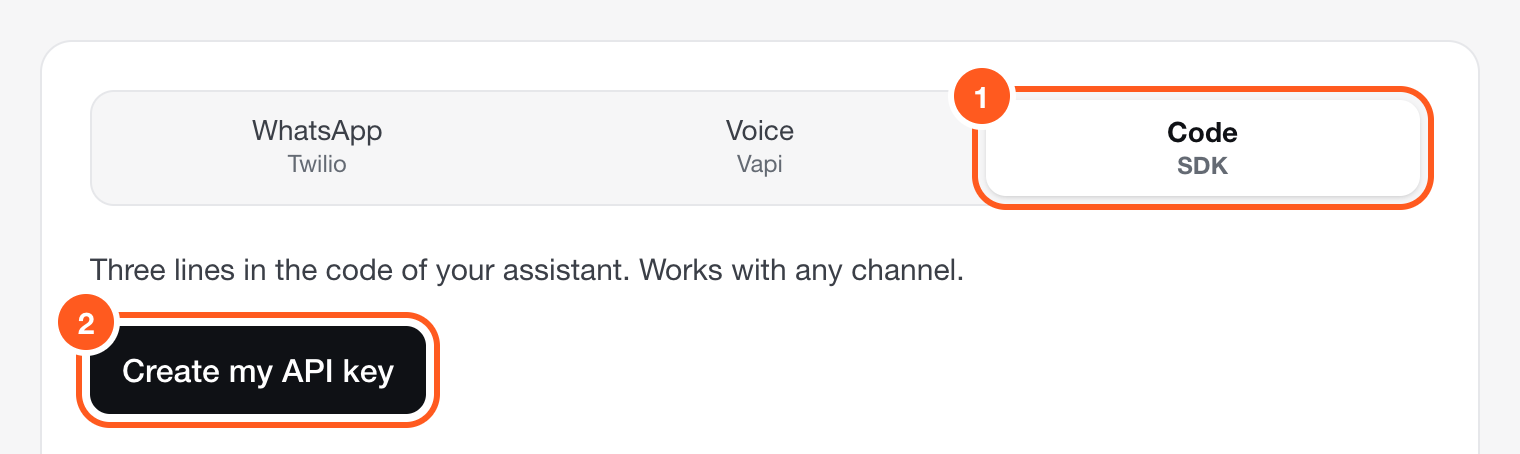
Setup, step 3. Already set up? Create more keys in Settings → Keys. Copy the key and the lines. The key is shown once.IN LEDGER
Ledger shows the environment line with your key in full, and the lines for your code, with your win type filled in.
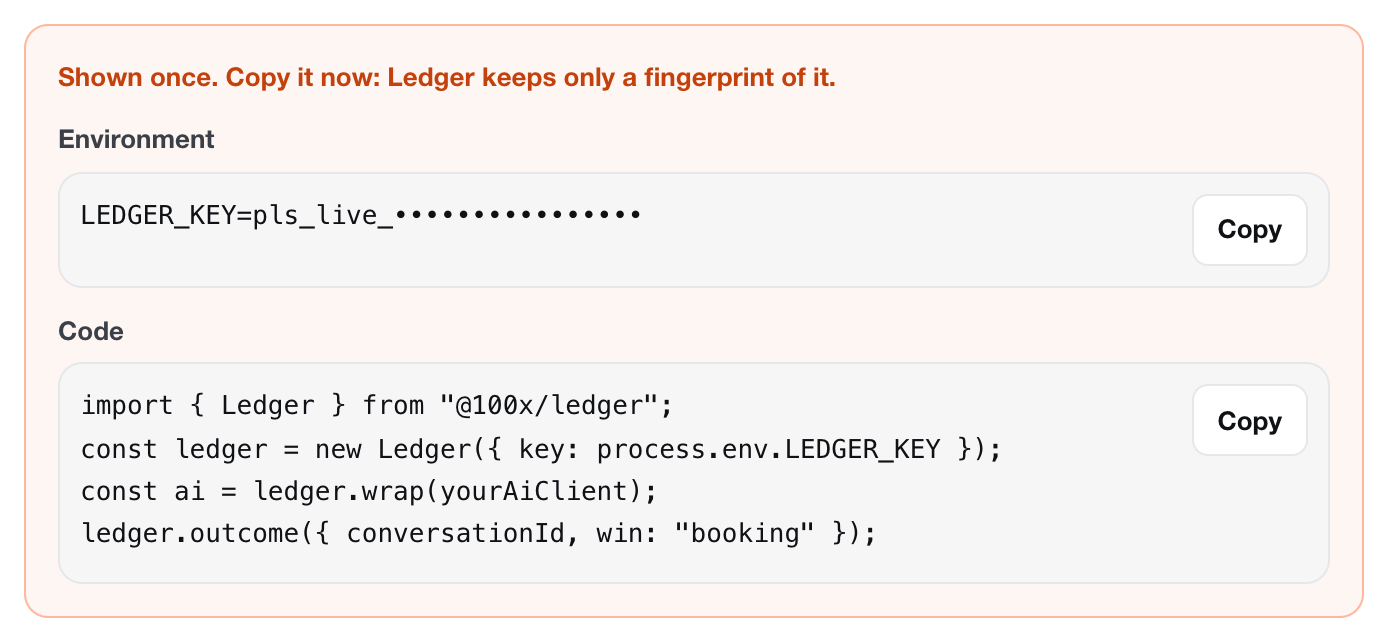
The key is hidden in this picture. Yours is shown in full. LEDGER_KEY=pls_live_… # your key, from setup step 3Put the LEDGER_KEY line in your environment (for example your .env file). Never commit it.
Install the packageIN YOUR CODE
# during the pilot: the package file 100x sends you
npm install ./100x-ledger-0.1.0.tgz

# soon, from npm
npm install @100x/ledger
Add the linesIN YOUR CODE
The lines Ledger gives you, in order: the import, the one line, the wrap, the win.
import { Ledger } from "@100x/ledger"; const ledger = new Ledger({ key: process.env.LEDGER_KEY }); const ai = ledger.wrap(yourAiClient); ledger.outcome({ conversationId, win: "booking" });yourAiClientstands for the AI client your assistant already uses. Each topic is explained below.Run one turn and watch the lightIN LEDGER
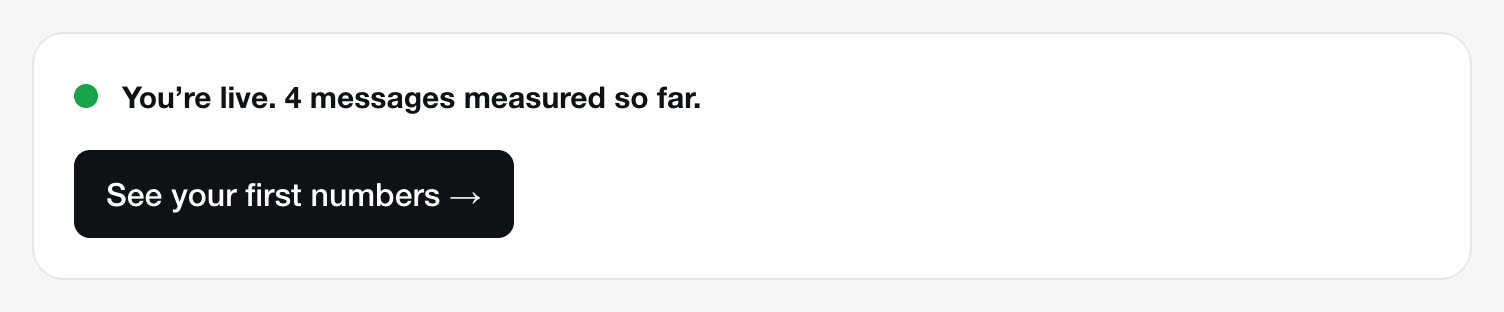
Send your assistant one real message. The light on the setup screen turns green within seconds. Then select See your first numbers.
Install
During the pilot, 100x sends you the package as a file. It goes to npm as @100x/ledger soon; the code stays the same.
# during the pilot: the package file 100x sends you
npm install ./100x-ledger-0.1.0.tgz

# soon, from npm
npm install @100x/ledger
The one line
Create one Ledger for your whole app, next to your AI client. Without a key, it reads LEDGER_KEY from the environment.
import { Ledger } from "@100x/ledger";

const ledger = new Ledger({ key: process.env.LEDGER_KEY });
Wrap your AI client
ledger.wrap() returns your client, measured. Every call records its time, the tokens in and out, the cache use, the stop reason and the tool names. Your requests and the responses are exactly the same objects as before.
import Anthropic from "@anthropic-ai/sdk";
import OpenAI from "openai";

const anthropic = ledger.wrap(new Anthropic()); // messages.create, streamed or not
const openai = ledger.wrap(new OpenAI());       // chat.completions.create, responses.create
To tie a call to a conversation, add a ledger option. Ledger reads it and removes it before the request is sent:
const reply = await anthropic.messages.create({
  ...yourUsualParams,
  ledger: { conversationId }, // optional: read by Ledger, removed before the request leaves
});
Or wrap a whole turn in ledger.context(). Every call and event inside it, across awaits, belongs to that conversation:
await ledger.context(conversationId, async () => {
  ledger.message({ role: "customer", text: incoming, customer: phone });
  const reply = await anthropic.messages.create({ ...yourUsualParams });
  ledger.message({ role: "agent", text: replyText });
});
The prompts and the answers never leave your app through wrap(): it sends counts and labels only.
The win: outcome
Call it where a win happens in your code. win is booking, resolution, lead, payment, meeting or custom. value and currency are optional; without a currency, Ledger uses your workspace’s.
ledger.outcome({ conversationId, win: "booking", value: 390, currency: "AED" });

// a win that is not final yet: send it as pending, then reuse its id
ledger.outcome({ id: "order-1182", conversationId, win: "payment", status: "pending", value: 250 });
ledger.outcome({ id: "order-1182", conversationId, win: "payment", status: "won", value: 250 });
Sent to your team: handoff
Call it when the assistant passes the conversation to a person. The reason shows on your dashboard, in plain words.
ledger.handoff({ conversationId, reason: "complaint" });The conversation: message
Send each line of the conversation, unless a Twilio or Vapi connector already sends them. Text is masked in your app before it is sent: phone numbers, emails, card numbers, IBANs, ID and passport numbers, and links.
ledger.message({
  conversationId,
  role: "customer",          // "customer" | "agent" | "staff" | "system"
  text: incoming,            // masked before it leaves your app
  customer: phone,           // optional: hashed by Ledger, never stored raw
  names: ["Sara Haddad"],    // optional: also mask these names
});
Phone calls without the Vapi connector? Send each one with ledger.call():
ledger.call({ conversationId, startedAt, endedAt, status: "answered", costUsd: 0.09 });
// status: "answered" | "missed" | "abandoned" | "transferred" | "voicemail"
Streams
- Streamed calls are measured as you read the stream. Every event reaches your code untouched.
- Anthropic:
messages.create({ stream: true })andmessages.stream()both work. - OpenAI chat: add
stream_options: { include_usage: true }. Without it, the call is timed but its tokens stay unknown. - If you stop reading a stream early, Ledger records what it saw up to that point.
// Anthropic: both forms are measured
const stream = await anthropic.messages.create({ ...yourUsualParams, stream: true });
for await (const event of stream) { /* your code, unchanged */ }

// OpenAI chat: ask for usage in the stream, or tokens stay unknown
const s = await openai.chat.completions.create({
  ...yourUsualParams,
  stream: true,
  stream_options: { include_usage: true },
});
It never throws
- No SDK method throws into your app. A bad input or a network error goes to
onError, if you pass one. - Events are sent in batches: every 2 seconds, or at once at 100 events.
- A failed batch is retried 3 times, with a growing wait, on a 429, a 5xx or a network error.
- At most 10,000 events wait in memory. When full, the oldest are dropped. Its timers never keep your process alive.
const ledger = new Ledger({
  key: process.env.LEDGER_KEY,
  onError: (err) => console.warn("[ledger]", err.message), // see problems; never thrown
});

// serverless or short scripts: send what is queued before the function ends
await ledger.flush();
// or, before the process exits
await ledger.shutdown();
All the options
new Ledger({
  key,              // pls_live_… (falls back to process.env.LEDGER_KEY)
  endpoint,         // default https://ledger.100xnative.com
  flushIntervalMs,  // default 2000
  maxBatch,         // default 100 (at most 500)
  maxQueue,         // default 10000; when full, the oldest events are dropped
  onError,          // (err: Error) => void
  disabled,         // true: do nothing; wrap() returns your client unchanged
});
How to know it works
1. The live light
Run one real turn of your assistant: a message in, a reply out. Then look at the light under the connect panel in /setup. It checks every 3 seconds, by itself.

2. The status endpoint
Open https://ledger.100xnative.com/api/v1/status in the browser where you are signed in to Ledger. Or call it with an API key (the same key your code uses):
curl -s https://ledger.100xnative.com/api/v1/status \
  -H "Authorization: Bearer $LEDGER_KEY"
A working connection answers with counts that go up as you test:
{
  "ok": true,
  "tenant": "your-workspace",
  "firstEventAt": "2026-10-25T15:44:03.420Z",
  "lastEventAt": "2026-10-25T15:44:03.419Z",
  "counts": { "conversations": 1, "messages": 4, "llmCalls": 0, "calls": 0, "outcomes": 0 }
}
llmCalls goes up with every wrapped AI call, outcomes with every ledger.outcome().
Troubleshooting
- “401 unauthorized”
Ledger did not recognise the secret. It was mistyped, cut short, or revoked.
- The key starts with
pls_live_followed by 32 letters and digits. Check thatLEDGER_KEYis set where your code runs, not only on your laptop. - Ledger shows each secret once and cannot show it again. Create a new one in Settings → Keys, then revoke the old one.
- The key starts with
- No data: the light stays grey
- The SDK sends every 2 seconds. A script or a serverless function can stop before that: add
await ledger.flush()at the end of the handler. - Pass
onErrorto see what went wrong. The SDK never throws, so problems are silent without it. - Check
disabledis not set totrue. - Open
/api/v1/status(above). If the counts move, data is arriving and the dashboard follows.
- The SDK sends every 2 seconds. A script or a serverless function can stop before that: add
- Conversations are grouped wrongly
With the SDK, you decide: every event with the same
conversationIdbelongs to one conversation.- Use one stable id per conversation, for example your chat thread id. Do not use a new id per message.
- Run each turn inside
ledger.context(conversationId, …)so every call and event inside it is tagged. ledger.message()andledger.handoff()without aconversationIdare dropped and reported toonError. An AI call without one still counts in your costs, but not in any conversation.
- Vapi: my assistant already has a server URL
Vapi sends each event to one URL only. Do not replace yours with Ledger’s: keep it, and forward the end-of-call report from your own handler (path B, 5 lines). See path B on the Vapi page.
Stuck? Message us and a person from 100x answers, usually the same day.
Message us